FPS
- Est. average
- 1% low
- Rendered avg.
- VRAM used / avail.
GPU FIELD REPORT / PROJECTED
RTX 4060 is pass in this model: 69 FPS average at 1080p High with Quality upscaling; real PC compatibility is unconfirmed.
Interactive Build & FPS Telemetry
Rockstar Games has not published official GTA 6 PC system requirements. All results are projections based on PS5 and Xbox Series X hardware and RAGE engine scaling.
Optional. GPU detection runs locally on this device only. You can enter your parts manually — CPU, RAM, and storage are always selected manually. Select your GPU manually under Configure your build. On Windows, open Task Manager → Performance or run dxdiag to find your GPU and CPU. See the guide to Windows (Task Manager / dxdiag): check your GPU & CPU.
Detection wrong or missing? Manually select your exact GPU, including the laptop variant where available. If the model is missing, choose the closest tier for a rough comparison only; check dedicated VRAM and the laptop graphics power limit. On dual-GPU laptops, select the discrete NVIDIA or AMD GPU rather than integrated graphics.
These are model estimates. Official GTA VI PC requirements are unannounced.
For a 30 or 60 FPS target, compare rendered average FPS at the desired resolution and preset, then use the 1% low to judge likely stutter. Generated frames (Frame Generation) only improve displayed smoothness and do not double base input responsiveness.
| Resolution | Medium | High | Recommended |
|---|
Scores use at least the High preset to show where higher settings would hit a limit.
No Immediate Upgrade Required
The PS5 and Xbox Series X baseline uses RDNA 2 graphics at approximately 10.28–12 TFLOPS, an 8-core Zen 2 CPU, 16 GB of unified memory, and custom high-speed SSDs with Gen4-class I/O. The PS5 uses a custom SSD design, and Xbox Series X uses a custom NVMe SSD. Hardware scores scale this baseline for projected RAGE engine workloads.
Actual PC performance, requirements, graphics features, and compatibility will depend on Rockstar Games’ PC implementation. Laptop and handheld results also vary with power limits, cooling, and shared memory allocation.
All numbers are model projections, not official Rockstar data or PC benchmarks. They use the default configuration of the interactive calculator above: NVIDIA GeForce RTX 4060 8GB · Intel Core i5-12400F · 16 GB system RAM · NVMe PCIe 4.0/5.0 SSD · Quality upscaling · Frame Generation Off.
The projected verdict describes the build at each resolution using the model's recommended preset, not a verdict for each row. The primary limit is the model's High or Ultra diagnostic; VRAM is estimated for the listed row. The static table describes the default build even if you change the interactive calculator.
| Resolution & Preset | Projected Avg FPS | Projected Range | 1% Low | Projected Verdict (build) | Primary Limit / Note |
|---|---|---|---|---|---|
| 1080p Low | 83 FPS | 70–95 FPS | 61 FPS | Pass · High recommended | No major bottleneck; VRAM 5.1 / 8 GB (modeled) |
| 1080p Medium | 79 FPS | 67–91 FPS | 58 FPS | Pass · High recommended | No major bottleneck; VRAM 6.1 / 8 GB (modeled) |
| 1080p High | 69 FPS | 58–79 FPS | 51 FPS | Pass · High recommended | No major bottleneck; VRAM 7.6 / 8 GB (modeled) |
| 1080p Ultra | 40 FPS | 34–46 FPS | 24 FPS | Pass · High recommended | No major bottleneck; VRAM 9.6 / 8 GB (modeled) |
| 1440p Low | 60 FPS | 51–69 FPS | 44 FPS | Pass · Medium recommended | Graphics memory headroom; VRAM 6.4 / 8 GB (modeled) |
| 1440p Medium | 54 FPS | 46–62 FPS | 40 FPS | Pass · Medium recommended | Graphics memory headroom; VRAM 7.5 / 8 GB (modeled) |
| 1440p High | 40 FPS | 34–46 FPS | 26 FPS | Pass · Medium recommended | Graphics memory headroom; VRAM 9 / 8 GB (modeled) |
BUILD PROFILE
Projections for the preset build above; no game benchmark or confirmed PC support.
| Specification or setting | Projection |
|---|---|
| Graphics hardware | 8 GB GDDR6 · 128-bit |
| Reference CPU | Intel Core i5-12400F |
| System RAM / storage | 16 GB / nvme-gen4 |
| 1080p high · quality | 69 FPS avg · 58–79 FPS range · 51 FPS 1% low |
| Model video memory | 7.6 / 8 GB used / available |
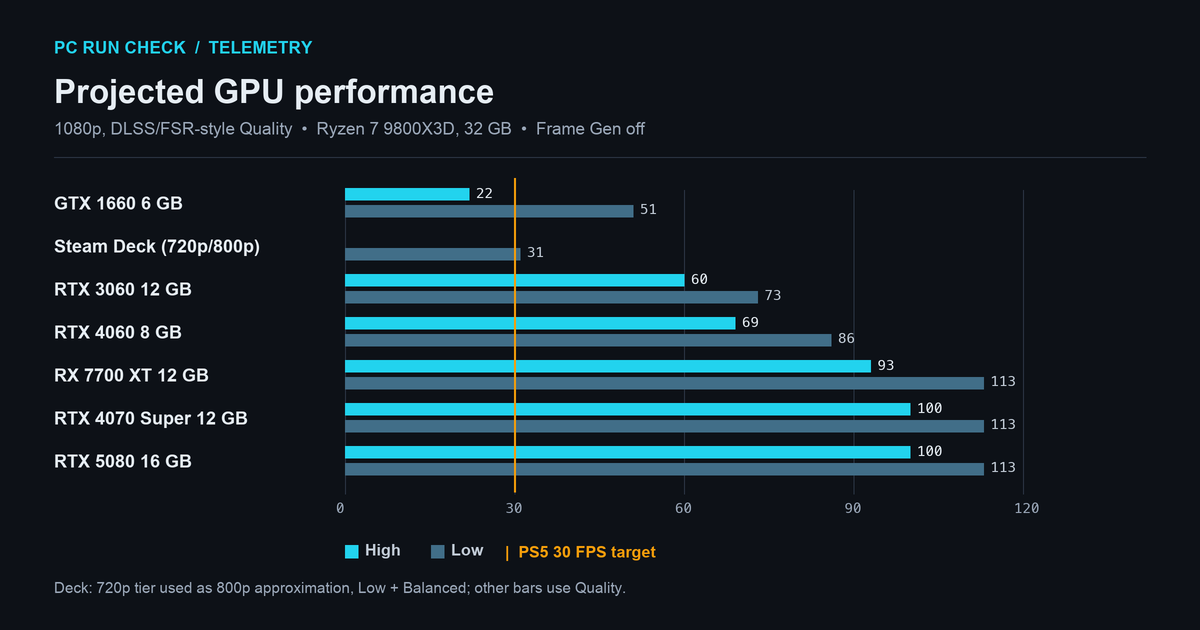
Our desktop reference pairs the RTX 4060 8 GB with a Core i5-12400F, 16 GB of RAM and an NVMe Gen4 SSD. For 1080p High, Quality upscaling and Frame Generation disabled, the engine estimates a 69 FPS average, a 58–79 FPS range and a 51 FPS 1% low. The verdict is Pass and the recommended preset is High. These are modeled outputs, not GTA VI PC measurements. Rockstar has not announced a PC release, official hardware specifications or a list of supported graphics features.
That distinction matters because our result depends on an assumed rendering workload. Changing processor, memory, output resolution or reconstruction mode changes the estimate. Enter your actual configuration in the tool above and use the published number as one reference point rather than a guarantee.
The RTX 4060 uses NVIDIA's Ada Lovelace architecture. According to NVIDIA’s specifications, the reference desktop card has a 115 W total graphics power rating. That draw can suit compact systems and modest power budgets. Individual cards, laptop versions and complete system consumption differ; consult the board manufacturer's specifications before planning a power supply. A lower rated draw can also make cooling and case airflow easier to manage, but it does not remove the need for adequate ventilation.
Power efficiency is useful over a long session, yet the game itself determines the workload. The model cannot know the final frame-time behavior of an unreleased PC port or the effect of a specific fan curve. Sustained clocks, ambient temperature, driver settings and competing applications can all influence real results. This page focuses on the desktop 8 GB part, not a laptop GPU with a similar name.
The 128-bit interface and 8 GB of dedicated memory shape this card's trade-offs. At 1080p High with Quality reconstruction, the model estimates 7.6 GB of graphics memory use, leaving relatively little nominal room. That is not an actual allocation from the game, and total capacity is not identical to free memory. Texture choices, render buffers, overlays and other programs can increase pressure. If a real game shows stuttering during traversal, memory occupancy and storage behavior are useful things to investigate alongside GPU utilization.
A narrower bus and cache design must be considered together; bus width alone cannot predict performance across architectures. The practical question is whether the chosen resolution, assets and workload fit the complete card. At 1440p, larger buffers can make the same 8 GB more restrictive. Reducing texture quality may help an overloaded memory budget, while reducing lighting or resolution can target processing load. The eventual settings and their costs remain unknown.
For the respective reference builds on these pages, our engine estimates 69 FPS for the 4060 and 60 FPS for the RTX 3060 12 GB at 1080p High with Quality scaling. The systems use different processors, so these are page configurations rather than a controlled GPU-only test. Both are generated by the same model with Frame Generation off. The newer card leads in this scenario, while the older 12 GB variant offers more memory capacity.
Neither fact makes one choice universally superior. If your workload is constrained by graphics processing at 1080p, the newer architecture may be attractive. If future assets put severe pressure on an 8 GB buffer, the 12 GB card's extra space may matter even though it has less raw throughput in the model. Price, power supply, warranty and the actual published PC requirements deserve equal attention. A card's average rate does not settle the question of frame pacing.
The 4060 supports NVIDIA's DLSS 3 Frame Generation capability in compatible titles. That hardware capability does not establish that a future GTA VI PC edition will include the feature. If it is supported, generated intermediate frames can make motion appear smoother while the game continues to render and process input at a lower base rate. Added buffering and processing can influence latency, and generated frames can introduce visual artifacts.
The checker separates its displayed FPS estimate from its rendered base rate and uses the underlying frames for 1% low calculations. It also models extra video-memory cost when Frame Generation is enabled. Test it as a second scenario after establishing a comfortable base frame rate; do not interpret a higher display counter as an equivalent doubling of CPU performance or input response. The precise effect in a real title requires independent measurement.
At 1440p High with Quality scaling, the same reference build projects a 40 FPS average. That is a model output under explicit assumptions, not a measured limit. The higher resolution increases the pixel and buffer workload; 8 GB capacity can become tighter as the settings rise. Try comparing a lower preset and different reconstruction modes in the tool instead of relying on one number alone.
When actual settings are available, a mixed configuration could retain important visual details while lowering the most expensive effects. A variable-refresh monitor may smooth moderate variation, but it cannot prevent poor frame pacing or make additional memory appear. If 1440p is your primary goal, compare cards at that resolution, check the cost of alternatives and wait for independently measured results.
The i5-12400F is a sensible six-core reference, but simulation, traffic and CPU scheduling remain unknown for the PC implementation. At a CPU limit, lowering resolution can produce little improvement. Choose your own processor and read the CPU telemetry beside the graphics and memory indicators. A properly cooled system and an appropriate memory configuration can matter more than a small theoretical difference between two similar components.
Sixteen gigabytes of system RAM is our baseline assumption; it is not an official minimum. An SSD is preferable for a large streamed world, while a faster NVMe drive will not necessarily raise a GPU-limited average. See the projected requirements, the budget GTX 1660 report, the Steam Deck report, or return to the full checker to compare your own hardware.
Before fitting a 4060, check the motherboard's PCIe generation and the electrical width of the slot. The desktop card uses an eight-lane PCIe 4.0 connection; in an older PCIe 3.0 slot it has less transfer bandwidth available. The impact varies by application and whether the graphics memory is under pressure, so neither a negligible penalty nor a severe penalty should be assumed for an untested game. Update firmware only when appropriate for your motherboard and follow its maker's instructions.
Ada also includes hardware encoding capabilities, including AV1 encoding on supported software. That can be useful when recording or streaming, but encoder support does not predict GTA VI's graphics performance or confirm a specific in-game feature. Recording, overlays and background broadcasting can consume system resources and memory. If you plan to capture footage, compare frame times with the capture software enabled and disabled once the game and a compatible PC edition are available. A tidy airflow path and a power supply that meets the board vendor's recommendations complete the physical setup.
FIELD NOTES / FAQ
Our i5-12400F reference build projects a 69 FPS average at High with Quality upscaling and Frame Generation off.
The model estimates 7.6 GB for its 1080p High Quality scenario, leaving limited nominal headroom. Actual game demand is unknown.
The GPU supports the technology in compatible titles, but no GTA VI PC feature support has been announced.
Generated frames may improve displayed smoothness but do not increase the base rendering or input rate equivalently and can add latency.
Our reference scenarios favor the 4060 at 1080p High while the 3060 has more VRAM. The best choice depends on workload, price and actual requirements.