Selected
rendered FPS
- 1% low
- Range
- With generated frames
- VRAM used / avail.
EIGHT GAMES / HARDWARE-SCALED ESTIMATES
Compare hardware-scaled frame-rate estimates across eight PC games and find the likely limit in your build.
Free in your browser. No download or account required. Pick a game, GPU, CPU, RAM and resolution — or check your Windows parts with the Task Manager / dxdiag guide — to estimate average FPS, 1% lows and bottlenecks.
GPU detection runs locally in this browser. Select your CPU, RAM, and storage manually. Select your GPU manually or find your PC specs.
Estimates use a hardware model informed by public benchmarks and game settings. Actual FPS varies by scene, patch, drivers, and system configuration.
The 1% low estimates frame rate during the slowest 1% of frames. Higher values generally mean steadier frame pacing.
| Resolution | Render avg. | 1% low | With FG |
|---|
Higher scores indicate more hardware headroom.
No hardware upgrade recommended for this build.
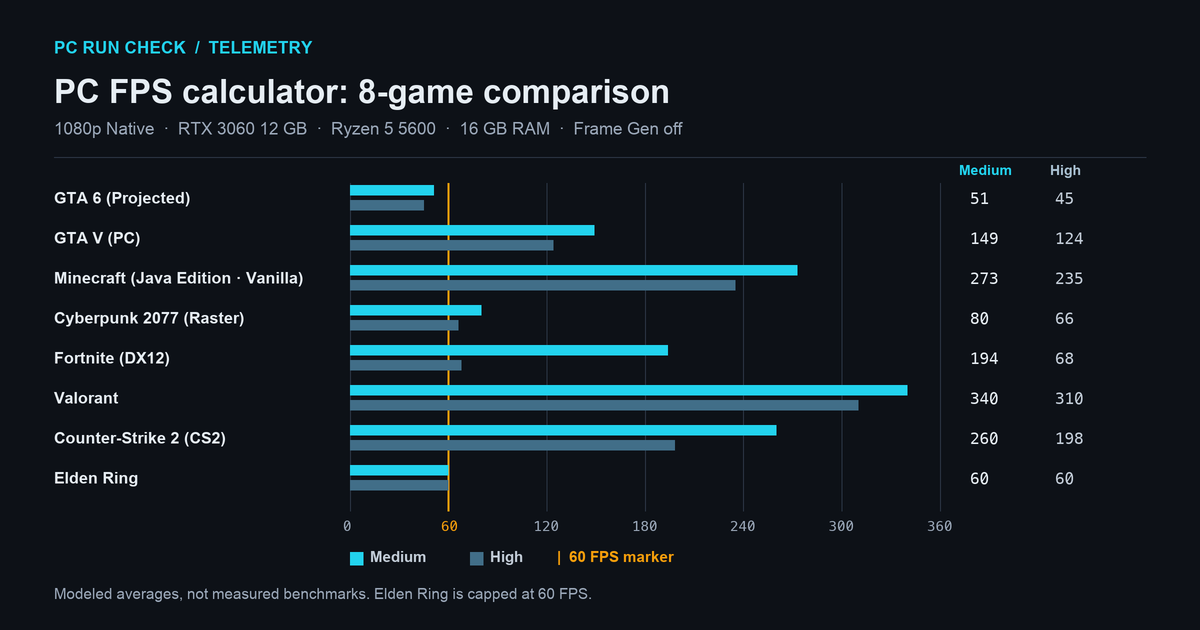
Hardware-scaled model projections, not in-game benchmarks: RTX 3060 12 GB, Ryzen 5 5600, 16 GB RAM, NVMe Gen4, 1080p native rendering, Frame Generation Off. Each cell shows estimated average / 1% low FPS. These values use the stated profiles and do not prove game compatibility.
| Game | 1080p Medium avg / 1% low | 1080p High avg / 1% low | Mode / Primary Limit | Key Caveat |
|---|---|---|---|---|
| GTA 6 (Projected) | 51 / 38 FPS | 45 / 34 FPS | Console-based open-world projection; Medium: GPU; High: GPU | Rockstar Games has not announced a PC edition or official PC specs as of November 26, 2026. These figures are PS5 and Xbox Series X RAGE model projections. |
| GTA V (PC) | 149 / 109 FPS | 124 / 96 FPS | Legacy raster open world; Medium: CPU; High: GPU | This profile uses standard GTA V Legacy raster settings. GTA V Enhanced ray tracing is more demanding and can run substantially slower. |
| Minecraft (Java Edition · Vanilla) | 273 / 164 FPS | 235 / 142 FPS | Single-thread-sensitive vanilla sandbox; Medium: CPU; High: CPU | Vanilla Java Edition at a typical render distance. Shader packs such as Complementary or BSL and high render distances can sharply increase GPU load and VRAM use. New chunk generation can cause additional CPU stalls. |
| Cyberpunk 2077 (Raster) | 80 / 65 FPS | 66 / 53 FPS | Heavy raster open world with dense crowds; Medium: GPU; High: GPU | Raster presets only. Ray Tracing and Path Tracing (Ray Tracing: Overdrive) run substantially slower. The frame-generation estimate uses standard interpolation with up to one inserted frame per rendered frame. |
| Fortnite (DX12) | 194 / 122 FPS | 68 / 49 FPS | Competitive settings or Nanite and Lumen visuals; Medium: balanced; High: GPU | Low and Medium model competitive DX12 settings with Nanite and Lumen off. High and Ultra model the heavier Nanite and Lumen visuals. Lumen can use hardware ray tracing automatically, and some older GPUs may lack these options. Crowded endgames can lower FPS. |
| Valorant | 340 / 260 FPS | 310 / 237 FPS | Lightweight, CPU-limited tactical shooter; Medium: CPU; High: CPU | Models live match rendering with V-Sync and the in-game FPS limiter off. Map, abilities and match intensity affect frame pacing. |
| Counter-Strike 2 (CS2) | 260 / 192 FPS | 198 / 150 FPS | CPU-sensitive shooter with moderate GPU demand; Medium: GPU; High: GPU | Map, smokes and crowded servers can lower frame rates. The Ultra option approximates Very High in the game. Estimates assume the client FPS limiter and V-Sync are off. |
| Elden Ring | 60 / 60 FPS | 60 / 60 FPS | Open-world action RPG with a native frame limit; Medium: game frame cap; High: game frame cap | Elden Ring has a 60 FPS native PC cap. The estimates assume ray tracing is off. Shader compilation and traversal can cause stutter even on capable hardware. |
The optional GPU detector checks the browser's WebGL renderer string on the device you are using. It can fail or report a generic name, particularly on laptops or privacy-restricted browsers; confirm the selection manually. It does not identify your CPU, RAM or storage, and a phone cannot detect the parts inside a separate PC.
Each game has a reference workload and preset assumptions. The calculator scales that reference using relative GPU throughput at the chosen resolution and CPU performance scores, with different sensitivity to single-core and multi-threaded work by game. It combines the estimated rendering and simulation limits, then adjusts for factors including the graphics-memory budget, RAM, storage, resolution and available upscaling. The 1% low is modeled separately to represent frame-pacing pressure; it is not a recorded percentile from your computer.
The published references include game-specific public benchmark comparisons, such as Cyberpunk 2077 raster tests, alongside official game specifications and feature descriptions. TechPowerUp's GPU database provides another useful relative-hardware reference. These sources inform comparison and calibration; they do not mean our team tested every GPU or CPU combination, and the reference scores are not a promise of performance in your scene.
A real game can behave differently after a patch or driver update. Cooling, laptop power limits, background applications, memory configuration, crowded scenes and streaming all affect results. Graphics presets are not identical across games, and VRAM allocation is not always the same as memory actually needed. Treat the displayed numbers as hardware-scaled model estimates, not in-game benchmarks or compatibility guarantees.
Average FPS summarizes the modeled frame rate over a workload; it does not describe every moment. The 1% low summarizes the slowest portion and is a useful indication of perceived hitching, though this tool estimates it rather than capturing frame times. A good average with weak lows deserves investigation: background tasks, memory pressure, thermal throttling and streaming can all make a session feel less smooth.
The bottleneck label identifies the model's most restrictive area for the selected scenario. If GPU rendering is the limit, try a lower resolution or graphics preset. If VRAM is under pressure, reduce texture detail where the game allows it. If the CPU is the limit, lowering resolution alone may produce little benefit. RAM and storage recommendations are approximations, not diagnostics of a specific faulty part.
Upscaling renders fewer internal pixels and reconstructs the output image; its gains and image quality vary by mode and implementation. Choose Native for a straightforward baseline, then compare a supported Quality or Balanced option. Do not assume a future GTA 6 PC release will include any named upscaler.
Frame Generation can add displayed frames between rendered ones, but generated frames do not provide the same input updates as frames rendered by the game. Compare the rendered average and 1% low first, then consider the separately modeled displayed rate, visual artifacts and possible latency. The calculator enables this option only for modeled game and GPU combinations; actual game support still needs checking.
Before buying, hold the game, preset, resolution and other parts constant and swap one component in the calculator. If a faster GPU barely changes the estimate, investigate the CPU or another limit; if more VRAM removes modeled pressure but the average stays low, rendering throughput may still matter. Confirm power supply, case fit, motherboard compatibility and independent benchmarks before ordering any upgrade.
GTA 6: As of November 26, 2026, Rockstar's release announcement identifies the console versions; a PC edition and official PC requirements remain unannounced. This calculator projects a possible PC workload from console-era hardware assumptions. It does not run or benchmark a PC edition. For the full build verdict use the GTA 6 PC checker, and review the assumptions in our projected GTA 6 PC requirements.
GTA 5: The model represents the Legacy DirectX 11 raster version. At lower settings, simulation and draw-call throughput can impose a CPU ceiling even if the GPU has more headroom. GTA V Enhanced includes different graphics features; ray tracing increases the load and is not represented by the Legacy result. Compare tests from the same edition before deciding which setting or component to change.
Cyberpunk 2077: The calculator models raster presets without ray tracing. Ray Tracing and Path Tracing, also called Ray Tracing: Overdrive, are different and much heavier workloads; a raster estimate should not be presented as their expected frame rate. Resolution, crowd density and available graphics memory also matter, especially when using detailed textures. Test upscaling only where the game and GPU support the selected feature.
Elden Ring: FromSoftware's standard PC game has an official 60 FPS cap, reflected in Bandai Namco's PC specifications. The calculator applies that cap to its displayed estimate. If it reports uncapped hardware headroom, that is a model of capacity before the limit, not a claim that the unmodified game will display those frames. Traversal and shader compilation can still cause stutter, and this profile assumes ray tracing is off.
The Minecraft entry represents Java Edition Vanilla with a typical render distance and an already loaded world. Its main thread can limit performance on a discrete GPU, so processor speed, world generation and render distance matter. This is not a Bedrock Edition, modpack or shader benchmark. Mojang's Java Edition system requirements are useful for checking basic support separately.
Shader packs add lighting, shadows and other effects that can shift the limit toward the GPU and VRAM. Larger texture packs and render distances may add memory pressure. Since the calculator does not model a particular shader pack, use its Vanilla result as a starting point and look for a benchmark of your intended pack, resolution and settings.
Fortnite's Low and Medium profiles approximate competitive DirectX 12 settings with Nanite and Lumen disabled. High and Ultra represent the heavier visual path with those features enabled; Lumen may use hardware ray tracing, and exact availability depends on the device and game settings. The difference is a change in workload, not merely the same image rendered faster or slower.
At competitive settings a faster CPU can matter more, while High and Ultra often shift pressure toward the GPU. Crowded endgames, effects and live updates may reduce the slower frames. Check Epic's rendering notes and test your own intended mode, since a creative map and a busy match need not behave alike.
For Valorant and Counter-Strike 2 (CS2), players with 144Hz–360Hz monitors often care about consistency as much as the average. CPU instructions per clock, cache, memory and the scene can influence the minimum pace at which frames are prepared. Smoke, abilities, busy servers and other effects make one benchmark scene an incomplete picture of a whole match.
The model assumes the game's limiter and V-Sync are off for these profiles. Its primary limit can still be the GPU at higher settings or resolution; a fast processor does not guarantee a high refresh rate. Compare 1% lows as well as averages, then measure a representative match on your own system.
FIELD NOTES / FAQ
It produces hardware-scaled estimates from game profiles and relative component scores, not measured in-game benchmarks. Drivers, thermals, scene complexity, updates and the exact build can make actual FPS and frame pacing different.
Yes. The calculator is free in your browser, with no download, account, sign-up or daily check limit. Calculations run locally after the page loads.
Select one of those games and your actual GPU, CPU, RAM, storage and resolution for a modeled estimate. Results do not guarantee compatibility or measured frame rates; check the game requirements and independent benchmarks too.
The standard PC game has a 60 FPS frame-rate cap, so the model applies it to displayed results. Any uncapped hardware headroom is an estimate before the limit, not the frame rate of the unmodified game.
This profile models Java Edition Vanilla, which can be CPU-limited. Shaders add GPU and graphics-memory work, so actual results with a shader pack can be much lower and are not predicted by the Vanilla profile.
No. As of November 26, 2026 Rockstar has not announced a PC edition or official PC requirements. The numbers are independent hardware-scaled projections, not measurements of a PC game.
Average FPS describes the modeled overall rate, while the 1% low estimates slower-frame behavior. Frame Generation adds displayed frames, but does not increase the rendered frame rate or input responsiveness by the same amount.
On Windows open Task Manager and look under Performance for CPU and GPU, or run dxdiag and check the System, Display and Render tabs. The home page has a step-by-step Windows guide; select your dedicated laptop GPU where applicable.
The optional detector reads a browser-exposed renderer string locally to suggest a GPU; it does not scan files or intentionally upload your selected hardware. Browsers may obscure the name, shared links reveal their selections, and normal hosting requests and Google Fonts still involve network traffic.