FPS
- Est. average
- 1% low
- Rendered avg.
- VRAM used / avail.
GPU FIELD REPORT / PROJECTED
GTX 1660 is borderline in this model: 50 FPS average at 1080p Low with Quality upscaling; real PC compatibility is unconfirmed.
Interactive Build & FPS Telemetry
Rockstar Games has not published official GTA 6 PC system requirements. All results are projections based on PS5 and Xbox Series X hardware and RAGE engine scaling.
Optional. GPU detection runs locally on this device only. You can enter your parts manually — CPU, RAM, and storage are always selected manually. Select your GPU manually under Configure your build. On Windows, open Task Manager → Performance or run dxdiag to find your GPU and CPU. See the guide to Windows (Task Manager / dxdiag): check your GPU & CPU.
Detection wrong or missing? Manually select your exact GPU, including the laptop variant where available. If the model is missing, choose the closest tier for a rough comparison only; check dedicated VRAM and the laptop graphics power limit. On dual-GPU laptops, select the discrete NVIDIA or AMD GPU rather than integrated graphics.
These are model estimates. Official GTA VI PC requirements are unannounced.
For a 30 or 60 FPS target, compare rendered average FPS at the desired resolution and preset, then use the 1% low to judge likely stutter. Generated frames (Frame Generation) only improve displayed smoothness and do not double base input responsiveness.
| Resolution | Medium | High | Recommended |
|---|
Scores use at least the High preset to show where higher settings would hit a limit.
No Immediate Upgrade Required
The PS5 and Xbox Series X baseline uses RDNA 2 graphics at approximately 10.28–12 TFLOPS, an 8-core Zen 2 CPU, 16 GB of unified memory, and custom high-speed SSDs with Gen4-class I/O. The PS5 uses a custom SSD design, and Xbox Series X uses a custom NVMe SSD. Hardware scores scale this baseline for projected RAGE engine workloads.
Actual PC performance, requirements, graphics features, and compatibility will depend on Rockstar Games’ PC implementation. Laptop and handheld results also vary with power limits, cooling, and shared memory allocation.
All numbers are model projections, not official Rockstar data or PC benchmarks. They use the default configuration of the interactive calculator above: NVIDIA GeForce GTX 1660 6GB · Intel Core i5-10400F · 16 GB system RAM · SATA III SSD · Quality upscaling · Frame Generation Off.
The projected verdict describes the build at each resolution using the model's recommended preset, not a verdict for each row. The primary limit is the model's High or Ultra diagnostic; VRAM is estimated for the listed row. The static table describes the default build even if you change the interactive calculator.
| Resolution & Preset | Projected Avg FPS | Projected Range | 1% Low | Projected Verdict (build) | Primary Limit / Note |
|---|---|---|---|---|---|
| 1080p Low | 50 FPS | 43–58 FPS | 34 FPS | Borderline · Low recommended | GPU rendering throughput; VRAM 5.1 / 6 GB (modeled) |
| 1080p Medium | 40 FPS | 34–46 FPS | 27 FPS | Borderline · Low recommended | GPU rendering throughput; VRAM 6.1 / 6 GB (modeled) |
| 1080p High | 22 FPS | 18–25 FPS | 11 FPS | Borderline · Low recommended | GPU rendering throughput; VRAM 7.6 / 6 GB (modeled) |
| 1080p Ultra | 10 FPS | 9–12 FPS | 4 FPS | Borderline · Low recommended | GPU rendering throughput; VRAM 9.6 / 6 GB (modeled) |
| 1440p Low | 29 FPS | 24–33 FPS | 18 FPS | Upgrade Needed · No playable preset | GPU rendering throughput; VRAM 6.4 / 6 GB (modeled) |
| 1440p Medium | 21 FPS | 17–24 FPS | 11 FPS | Upgrade Needed · No playable preset | GPU rendering throughput; VRAM 7.5 / 6 GB (modeled) |
| 1440p High | 12 FPS | 10–14 FPS | 5 FPS | Upgrade Needed · No playable preset | GPU rendering throughput; VRAM 9 / 6 GB (modeled) |
BUILD PROFILE
Projections for the preset build above; no game benchmark or confirmed PC support.
| Specification or setting | Projection |
|---|---|
| Graphics hardware | 6 GB GDDR5 · no dedicated RT cores |
| Reference CPU | Intel Core i5-10400F |
| System RAM / storage | 16 GB / sata-ssd |
| 1080p low · quality | 50 FPS avg · 43–58 FPS range · 34 FPS 1% low |
| Model video memory | 5.1 / 6 GB used / available |
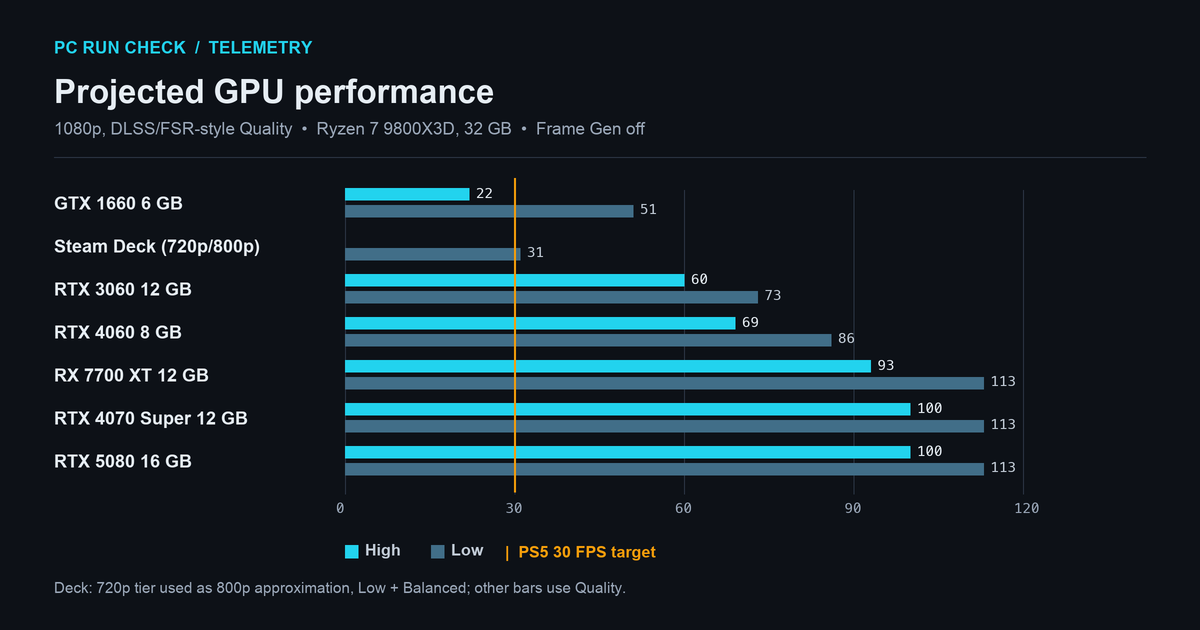
Our GTX 1660 desktop scenario uses a Core i5-10400F, 16 GB of system RAM and a SATA SSD. At 1080p Low with Quality upscaling and no generated frames, the engine projects a 50 FPS average, a 43–58 FPS range and a 34 FPS 1% low. Its verdict is Borderline. The same inputs at High produce a much lower projection because the model applies heavier rendering and memory costs. These figures are calculations, not measurements of a PC release, and they cannot establish compatibility.
Rockstar has not announced a GTA VI PC edition or its official requirements. An older GPU can therefore look plausible in a hypothetical model and still encounter an unsupported graphics feature, a different minimum specification or worse real-world frame pacing. Treat the result as a way to plan, not as a reason to buy the game or hardware on a promise.
The original GTX 1660 uses 6 GB of GDDR5 video memory, as listed in NVIDIA’s 16-series specifications. That capacity must hold the graphics workload alongside driver and application allocations. In our Quality-upscaled 1080p Low scenario, the model estimates about 5.1 GB used; at High it estimates approximately 7.6 GB, exceeding the card's nominal capacity. These values are model assumptions rather than a trace of the game. Actual asset sizes, resolution, settings and memory management could be very different.
A full video-memory budget can cause assets to move through slower pathways and affect frame pacing. If a future game allows it, lower texture settings before assuming every graphics option needs to be minimized. Lowering output resolution can also reduce buffer requirements. The most useful setting will depend on the actual bottleneck, and no final GTA VI PC settings menu has been published.
The GTX 1660 lacks dedicated hardware ray-tracing cores. Our engine applies a larger penalty to older non-RT hardware in demanding presets and warns about compatibility uncertainty. That is a simplified workload assumption. It does not prove that GTA VI will require hardware ray tracing on PC, or that the GTX 1660 will be supported without it. If a future implementation requires a particular hardware-accelerated global-illumination or ray-tracing path, this class of card could face a much more serious problem than lower FPS.
Likewise, the console game does not provide a direct list of PC graphics options. Wait for Rockstar's actual hardware and API requirements. When independent benchmarks become possible, check whether a tester used this exact card, the driver, a reconstruction mode and the same scene. A short average from a different GPU is not reliable evidence of compatibility.
The original 1660 does not have the Tensor hardware used for NVIDIA DLSS Super Resolution. AMD's FSR 2 or FSR 3 reconstruction can work on a wider range of GPUs in titles that implement the relevant feature, but support, quality and version depend on the game. Their presence in a future GTA VI PC edition has not been confirmed. Our Quality control models an uplift; it does not install, enable or validate a named upscaler.
More aggressive scaling reduces the internal rendering workload but can soften fine detail or introduce artifacts. It cannot compensate for a game that refuses to run on an unsupported feature set, and it may not fix a processor bottleneck. The tool models a separate generated-frame option only for eligible hardware; it should never be confused with an improvement in the responsiveness of the base rendered frames.
The 1660 Super and 1660 Ti are distinct products. The Super uses faster GDDR6 memory rather than the original model's GDDR5, and the Ti has its own configuration. They can produce different results even though their names look similar, while all three commonly have 6 GB of VRAM. Select the closest exact entry in the checker if it is available instead of entering the original model and treating the result as interchangeable.
Laptop parts add another layer of uncertainty: cooling, sustained power and memory configuration can diverge from desktop boards. A successful WebGL family match is only a starting point. Check the detected model manually and verify the GPU's actual memory with system tools or the manufacturer's documentation. Browser detection does not measure performance.
The i5-10400F is a six-core reference for this page. When the graphics workload is dominant, a faster processor may not make a dramatic difference at the same settings. In busy scenes, simulation and background activity can still limit 1% lows. Compare the tool's CPU and GPU telemetry, then change one variable at a time.
A SATA SSD is the modeled storage choice. It can provide more responsive access than a mechanical hard drive, although its exact effect on a final game is unknown. Keep free space for the operating system and future updates. Sixteen gigabytes of RAM is our assumption, not an official minimum. Avoid interpreting any one projected average as a complete description of loading, stutter or compatibility.
The RTX 3060 12 GB provides more graphics memory, while the RTX 4060 8 GB offers a different balance of modeled throughput and capacity. Compare each at the same resolution and settings to see which bottleneck changes in your build.
Check local pricing, PSU and case limits, and wait for official specifications before spending. Use the complete requirements guide to compare projected tiers, the Steam Deck page for a handheld scenario and the checker to try your own processor, storage and resolution.
FIELD NOTES / FAQ
With an i5-10400F and Quality upscaling, our 1080p Low scenario projects 50 FPS on average and a Borderline verdict.
No. It lacks dedicated ray-tracing cores, and future compatibility depends on the PC version’s unpublished requirements.
The GTX 1660 lacks the Tensor hardware for DLSS Super Resolution. A game might offer other reconstruction options, but GTA VI PC support is unconfirmed.
No. They are separate models with different specifications; choose the exact model in the checker when available.
Check prices, power and case constraints, and consider waiting for official requirements and independent tests before buying for this game alone.