FPS
- Est. average
- 1% low
- Rendered avg.
- VRAM used / avail.
PS5 & XSX RAGE Telemetry Model · 122 GPUs · 110 CPUs
Estimate GTA 6 performance for your build, see the bottleneck and compare settings before official PC specifications are announced.
Free to use in your browser. No download or account required. Select your GPU, CPU, RAM, and storage — or use the Windows Task Manager / dxdiag guide below — to compare projected FPS.
Interactive Build & FPS Telemetry
Rockstar Games has not published official GTA 6 PC system requirements. All results are projections based on PS5 and Xbox Series X hardware and RAGE engine scaling.
Optional. GPU detection runs locally on this device only. You can enter your parts manually — CPU, RAM, and storage are always selected manually. Select your GPU manually under Configure your build. On Windows, open Task Manager → Performance or run dxdiag to find your GPU and CPU. See the guide to Windows (Task Manager / dxdiag): check your GPU & CPU.
Detection wrong or missing? Manually select your exact GPU, including the laptop variant where available. If the model is missing, choose the closest tier for a rough comparison only; check dedicated VRAM and the laptop graphics power limit. On dual-GPU laptops, select the discrete NVIDIA or AMD GPU rather than integrated graphics.
These are model estimates. Official GTA VI PC requirements are unannounced.
For a 30 or 60 FPS target, compare rendered average FPS at the desired resolution and preset, then use the 1% low to judge likely stutter. Generated frames (Frame Generation) only improve displayed smoothness and do not double base input responsiveness.
| Resolution | Medium | High | Recommended |
|---|
Scores use at least the High preset to show where higher settings would hit a limit.
No Immediate Upgrade Required
The PS5 and Xbox Series X baseline uses RDNA 2 graphics at approximately 10.28–12 TFLOPS, an 8-core Zen 2 CPU, 16 GB of unified memory, and custom high-speed SSDs with Gen4-class I/O. The PS5 uses a custom SSD design, and Xbox Series X uses a custom NVMe SSD. Hardware scores scale this baseline for projected RAGE engine workloads.
Actual PC performance, requirements, graphics features, and compatibility will depend on Rockstar Games’ PC implementation. Laptop and handheld results also vary with power limits, cooling, and shared memory allocation.
WebGL may report an Apple M-series chip or Apple GPU. Apple Silicon is outside this Windows PC hardware database, so this checker cannot predict native macOS support or compatibility from that result.
PICK YOUR HARDWARE
Modeled configurations, ready to explore.
12 GB memory, 1080p High + Quality
60 FPS projected avg02 / DESKTOP GPU8 GB Ada, 1080p High + Quality
69 FPS projected avg03 / DESKTOP GPU6 GB, 1080p Low + Quality
50 FPS projected avg04 / HANDHELD720p/800p approximation, Low + Balanced
31 FPS projected avgOne projected baseline for every row: AMD Ryzen 5 5600, 16 GB system RAM, NVMe PCIe 4.0 SSD, 1080p, Quality upscaling, and Frame Generation Off. All FPS and verdicts are model projections, not official Rockstar data or PC benchmarks.
The projected verdict describes the build at 1080p using the model's recommended preset, not a separate verdict for each listed preset. The bottleneck diagnosis uses the model's High or Ultra diagnostic preset; VRAM is the modeled High value.
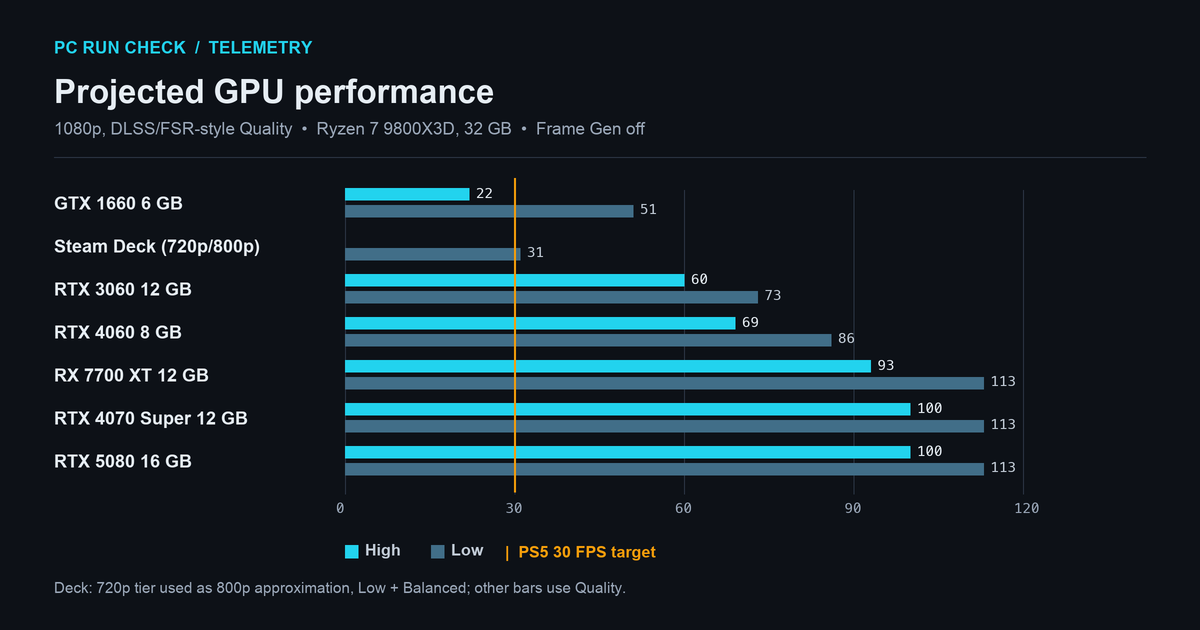
| GPU | Projected 1080p Medium FPS | Projected 1080p High FPS | Primary Bottleneck / VRAM Note | Projected Verdict (build) |
|---|---|---|---|---|
| NVIDIA GeForce GTX 1660 6GB | 40 FPS | 22 FPS | GPU rendering throughput; High VRAM 7.6 / 6 GB (modeled) | Borderline · Low recommended |
| NVIDIA GeForce RTX 2060 6GB | 52 FPS | 34 FPS | Graphics memory headroom; High VRAM 7.6 / 6 GB (modeled) | Pass · Medium recommended |
| NVIDIA GeForce RTX 3050 8GB | 53 FPS | 45 FPS | GPU rendering throughput; High VRAM 7.6 / 8 GB (modeled) | Pass · Medium recommended |
| AMD Radeon RX 6600 8GB | 63 FPS | 53 FPS | No major bottleneck; High VRAM 7.6 / 8 GB (modeled) | Pass · High recommended |
| NVIDIA GeForce RTX 3060 12GB | 68 FPS | 60 FPS | No major bottleneck; High VRAM 7.6 / 12 GB (modeled) | Pass · High recommended |
| NVIDIA GeForce RTX 4060 8GB | 75 FPS | 69 FPS | No major bottleneck; High VRAM 7.6 / 8 GB (modeled) | Pass · High recommended |
| NVIDIA GeForce RTX 4070 12GB | 75 FPS | 69 FPS | No major bottleneck; High VRAM 7.6 / 12 GB (modeled) | Pass · Ultra recommended |
Desktop and laptop GPUs with similar names can differ sharply: the desktop RTX 3060 reference has 12 GB VRAM, while the RTX 3060 Laptop GPU uses 6 GB alongside manufacturer-set power and cooling limits; see the projected requirements for context. To compare upgrades fairly, keep CPU, RAM, resolution, and upscaling fixed and swap one part at a time in the checker to compare projected FPS and bottlenecks. These are game performance projections only: check motherboard/CPU socket compatibility, PSU wattage, case clearance and current local pricing separately before buying parts.
Compare all projected GTA 6 PC requirements| Projected tier | Starting point |
|---|---|
| Minimum · 1080p Low | GTX 1660 6 GB · 16 GB RAM · SSD |
| Recommended · 1080p–1440p High | RTX 3060 / 4060 · 16 GB RAM · SSD |
| High · 1440p High | RX 7700 XT / RTX 4070 Super · 32 GB RAM · SSD |
| Ultra · 4K Ultra | RTX 5080 16 GB · 32 GB RAM · SSD |
See the complete tier breakdown, API/OS unknowns and assumptions for details.
If you are asking can my PC run GTA 6, start with the hardware you already own. Select your GPU and CPU, choose installed RAM and storage, then set the resolution and an upscaling mode. The checker compares that configuration with a modeled console baseline and shows estimated frame rates for several presets. Rockstar's official page lists PlayStation 5 and Xbox Series X|S; a PC release date and official PC requirements are unannounced as of November 26, 2026. This page estimates what your PC might handle; it does not test a released PC game.
If you are asking can I run GTA 6 on my PC, enter your actual components above to see a projected FPS range, identify the bottleneck and compare which upgrade could help first. The answer remains uncertain until that edition and its requirements are confirmed.
For other titles, use the frame-rate calculator to compare estimates with the same components and settings.
Console hardware is a starting point for the model, not proof that a PC will run the game or reach a particular FPS. Use the checker verdict with its projected FPS range and bottleneck, then review the assumptions behind the GTA 6 PC requirements.
Pass means the model found a non-Low preset with adequate estimated rendered FPS, 1% lows, available video memory and a sensible RAM and storage configuration. It does not guarantee the game will launch. Borderline means a lower preset may be playable in the model but heavy scenes or limited headroom make the experience less predictable. Upgrade Needed means even the projected Low preset misses the model's playable thresholds at the chosen output resolution. Change one input at a time to understand why a verdict changes.
When asking can my PC run GTA 6, pick your desired resolution, find your chosen preset in the breakdown, and compare its rendered average FPS with your 30 or 60 FPS target; use the 1% low to judge likely stutter. The displayed range represents uncertainty around a modeled average, not a measured minimum and maximum for every scene.
Strong Pass requires at least 32 GB RAM and a non-HDD drive, plus a High or Ultra recommendation meeting at least 50 rendered frames per second on average, a 1% low of 32, and modeled VRAM use no more than 104.5% of available VRAM. At High, the model must also reach at least 65 rendered average and 42 for the 1% low. Look at the recommended preset, four-axis bottleneck readout and warnings together.
The checker has no separate GTA VI PC ray-tracing toggle or RT benchmark; 1080p and 1440p High/Ultra projections are not measured ray-tracing frame rates. Actual PC ray-tracing requirements depend on Rockstar's eventual announcement.
To decide which component to upgrade first, keep the same resolution and preset while testing one replacement at a time. Prefer the change that improves the limiting result and its slower frames; if the verdict barely moves, another part may be the more useful first upgrade.
For a reproducible comparison, use 1080p High, Quality upscaling, Frame Generation off, 16 GB RAM and NVMe Gen4 storage. These are current model outputs in FPS (average / 1% low), not official requirements or real PC benchmarks:
If you're asking can my PC run GTA 6 and projected FPS is low, compare the GPU bottleneck with the VRAM readout before changing settings or choosing an upgrade. High memory pressure points toward lower textures or more VRAM; see video memory requirements.
A CPU bottleneck may remain even after lowering resolution, while too little RAM or a slow drive can hurt frame pacing. Use the checker to decide whether the processor, memory or storage deserves attention first, and read the CPU and system requirements.
Try Quality or Balanced upscaling when the model shows a GPU limit, and compare rendered FPS and 1% lows before enabling Frame Generation. Generated frames do not remove a CPU bottleneck or double input responsiveness; see upscaling and Frame Generation.
The optional Detect My GPU button asks the browser for a WebGL renderer string and tries to match it to the local hardware catalog. The lookup runs in your browser. Some browsers hide or generalize the renderer, and an ambiguous model may need manual correction. The detector cannot reliably identify every laptop variant, CPU, memory size or drive, so inspect each selection before interpreting the result.
Use the share control to copy a link containing the selected build in the URL fragment. Anyone with that link can see the configuration encoded in it, so share it only when you intend to disclose those choices. The fragment is used by the page to restore the build; the checker does not intentionally transmit the GPU detection result to a server. The site does load Google Fonts, and ordinary web hosting may process request logs. See the privacy policy for the distinction.
For handheld owners asking can my PC run GTA 6, the Steam Deck report uses the handheld's own APU and shared memory assumptions rather than pretending it is a desktop graphics card. Its 720p tier is an approximation for a typical 800p display, and Proton, launcher and anti-cheat compatibility have not been confirmed. Use the estimate to plan a possible low-settings target, not as evidence of support. Revisit every result when Rockstar publishes a real PC build and independent tests become available.
FIELD NOTES / FAQ
No. Rockstar’s official page at https://www.rockstargames.com/VI lists PlayStation 5 and Xbox Series X|S; a PC release date and official PC requirements are unannounced as of November 26, 2026. This page estimates what your PC might handle; it does not test a released PC game. Its FPS results are model projections, not official requirements or measured PC benchmarks. See /gta-6-pc-requirements for the projected tiers.
Rockstar has not announced a PC edition or official PC requirements yet. In our model, a 6 GB VRAM GPU with 16 GB RAM and an SSD is a borderline 1080p Low starting point, while RTX 3060 or RTX 4060 class GPUs are projected for 1080p–1440p Medium–High depending on the build. Enter your exact GPU, CPU, RAM, and storage in the live checker above for a tailored FPS and bottleneck estimate.
Detailed FPS and bottleneck results are free, with no paywall, account, email or .exe download required. Pick your GPU, CPU, RAM, storage and target resolution to compare model projections.
Yes. Enter your desktop or laptop parts manually in your phone’s browser; there is no daily check limit. Changing any part recalculates instantly in your browser. Copy a share link before swapping parts to restore and compare that build later. Once the page loads online, the calculation runs locally in your browser. Optional WebGL detection checks only the device you are currently browsing on.
Eight gigabytes may be workable at a tuned 1080p profile in our model, but the final PC requirements, texture options and memory needs are unknown. Check the GPU and memory estimates together.
Our 1080p Low, Quality-upscaled GTX 1660 build is Borderline. This is a projection, and compatibility is uncertain, especially if a future PC version requires hardware ray tracing.
We use 16 GB of system RAM as a planning assumption, not an official requirement. The final game, background apps and shared graphics memory may change what is practical.
No PC storage requirement has been announced. Our model penalizes an HDD because slower asset streaming can hurt frame pacing; an SSD is the safer planning assumption.
The checker does not scan local files, require an install, upload your hardware selections or store your build as user data. The optional button only reads a browser-exposed WebGL renderer string locally in your browser to suggest a GPU; CPU, RAM and storage are selected manually. Shared build links reveal their encoded selections to anyone receiving the link. Google Fonts, ordinary web hosting requests and limited anonymous interaction events are documented in /privacy-policy.
A laptop or Deck can be modeled, but PC availability, handheld software compatibility and actual performance are unconfirmed. Laptop power limits and the Deck’s shared memory matter.