FPS
- Est. average
- 1% low
- Rendered avg.
- VRAM used / avail.
GPU FIELD REPORT / PROJECTED
RTX 3060 is pass in this model: 60 FPS average at 1080p High with Quality upscaling; real PC compatibility is unconfirmed.
Interactive Build & FPS Telemetry
Rockstar Games has not published official GTA 6 PC system requirements. All results are projections based on PS5 and Xbox Series X hardware and RAGE engine scaling.
Optional. GPU detection runs locally on this device only. You can enter your parts manually — CPU, RAM, and storage are always selected manually. Select your GPU manually under Configure your build. On Windows, open Task Manager → Performance or run dxdiag to find your GPU and CPU. See the guide to Windows (Task Manager / dxdiag): check your GPU & CPU.
Detection wrong or missing? Manually select your exact GPU, including the laptop variant where available. If the model is missing, choose the closest tier for a rough comparison only; check dedicated VRAM and the laptop graphics power limit. On dual-GPU laptops, select the discrete NVIDIA or AMD GPU rather than integrated graphics.
These are model estimates. Official GTA VI PC requirements are unannounced.
For a 30 or 60 FPS target, compare rendered average FPS at the desired resolution and preset, then use the 1% low to judge likely stutter. Generated frames (Frame Generation) only improve displayed smoothness and do not double base input responsiveness.
| Resolution | Medium | High | Recommended |
|---|
Scores use at least the High preset to show where higher settings would hit a limit.
No Immediate Upgrade Required
The PS5 and Xbox Series X baseline uses RDNA 2 graphics at approximately 10.28–12 TFLOPS, an 8-core Zen 2 CPU, 16 GB of unified memory, and custom high-speed SSDs with Gen4-class I/O. The PS5 uses a custom SSD design, and Xbox Series X uses a custom NVMe SSD. Hardware scores scale this baseline for projected RAGE engine workloads.
Actual PC performance, requirements, graphics features, and compatibility will depend on Rockstar Games’ PC implementation. Laptop and handheld results also vary with power limits, cooling, and shared memory allocation.
All numbers are model projections, not official Rockstar data or PC benchmarks. They use the default configuration of the interactive calculator above: NVIDIA GeForce RTX 3060 12GB · AMD Ryzen 5 5600 · 16 GB system RAM · NVMe PCIe 4.0/5.0 SSD · Quality upscaling · Frame Generation Off.
The projected verdict describes the build at each resolution using the model's recommended preset, not a verdict for each row. The primary limit is the model's High or Ultra diagnostic; VRAM is estimated for the listed row. The static table describes the default build even if you change the interactive calculator.
| Resolution & Preset | Projected Avg FPS | Projected Range | 1% Low | Projected Verdict (build) | Primary Limit / Note |
|---|---|---|---|---|---|
| 1080p Low | 73 FPS | 62–83 FPS | 54 FPS | Pass · High recommended | No major bottleneck; VRAM 5.1 / 12 GB (modeled) |
| 1080p Medium | 68 FPS | 57–78 FPS | 50 FPS | Pass · High recommended | No major bottleneck; VRAM 6.1 / 12 GB (modeled) |
| 1080p High | 60 FPS | 51–69 FPS | 44 FPS | Pass · High recommended | No major bottleneck; VRAM 7.6 / 12 GB (modeled) |
| 1080p Ultra | 41 FPS | 35–47 FPS | 31 FPS | Pass · High recommended | No major bottleneck; VRAM 9.6 / 12 GB (modeled) |
| 1440p Low | 53 FPS | 45–61 FPS | 39 FPS | Borderline · High recommended | GPU rendering throughput; VRAM 6.4 / 12 GB (modeled) |
| 1440p Medium | 49 FPS | 42–57 FPS | 37 FPS | Borderline · High recommended | GPU rendering throughput; VRAM 7.5 / 12 GB (modeled) |
| 1440p High | 44 FPS | 37–50 FPS | 32 FPS | Borderline · High recommended | GPU rendering throughput; VRAM 9 / 12 GB (modeled) |
BUILD PROFILE
Projections for the preset build above; no game benchmark or confirmed PC support.
| Specification or setting | Projection |
|---|---|
| Graphics hardware | 12 GB GDDR6 · 192-bit |
| Reference CPU | AMD Ryzen 5 5600 |
| System RAM / storage | 16 GB / nvme-gen4 |
| 1080p high · quality | 60 FPS avg · 51–69 FPS range · 44 FPS 1% low |
| Model video memory | 7.6 / 12 GB used / available |
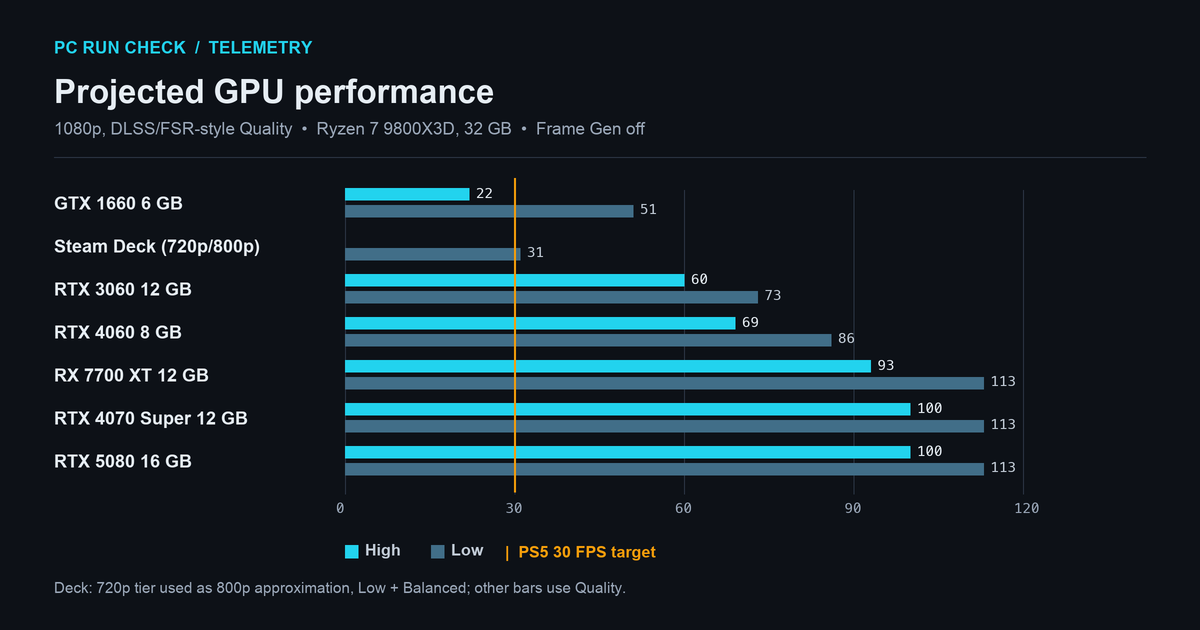
For the desktop RTX 3060 12 GB, our reference build combines a Ryzen 5 5600, 16 GB of system memory and an NVMe Gen4 SSD. At 1080p High with Quality upscaling and Frame Generation off, the engine projects a 60 FPS average, a 51–69 FPS range and a 44 FPS 1% low. It selects High and returns Pass. This is a calculation for a hypothetical PC edition, not a measured benchmark; Rockstar has not announced the PC version or its specifications. Final performance and feature support could differ materially.
The stronger reason to investigate this model is its memory budget. Twelve gigabytes gives the desktop card room to accommodate a heavier texture profile than a smaller buffer, but memory alone does not determine rendering speed. Select your real processor, drive and resolution in the checker above and compare the result with the default configuration before drawing conclusions.
The RTX 3060 desktop card commonly has 12 GB of VRAM, while the laptop GPU has 6 GB and a different power budget. If you are checking a used card, confirm the exact variant before relying on its projected FPS.
This projected snapshot compares the 12 GB desktop reference with a Ryzen 5 5600 against the 6 GB laptop GPU with an Intel Core i7-12700H. Both builds use 16 GB RAM, an NVMe Gen4 SSD, Quality upscaling and Frame Generation off; because the CPUs and VRAM differ, this is a comparison of builds rather than a controlled GPU-only test.
| Resolution and preset | Desktop 12 GB | Laptop 6 GB |
|---|---|---|
| 1080p Low | 73 FPS | 66 FPS |
| 1080p Medium | 68 FPS | 56 FPS |
| 1080p High | 60 FPS | 37 FPS |
| 1440p Medium | 49 FPS | 31 FPS |
These are projected averages. At 1080p Low, 54 FPS for the desktop and 49 FPS for the laptop are the modeled 1% lows: both averages exceed a 60 FPS target, but neither low reaches it. The three Medium and High laptop rows exceed the model's 6 GB VRAM budget; real graphics-memory demand and PC performance are unconfirmed.
Laptop manufacturers set different TGP power limits, and chassis cooling affects sustained performance. The model uses fixed laptop GPU scores rather than predicting the behavior of each individual configuration.
Quality reconstruction is a sensible scenario to investigate because it may ease rendering load while retaining more detail than a more aggressive scaling mode. In the model, this profile reaches the result at the top of the page without generated frames. DLSS is an example of a compatible reconstruction technology for this GPU, but its inclusion in a future GTA VI PC version is unconfirmed. Native rendering will apply a different workload; use the control above to compare rather than mixing the two modes.
Once there is a real settings menu, start by adjusting costly lighting and shadow options separately from texture resolution. If dedicated memory remains available yet rendering is too slow, lowering textures alone may not be the most effective change. If memory pressure is high or stutter appears during rapid movement, lower the texture budget and monitor frame pacing. These are general diagnostic principles, not claims about unpublished game options.
With the same modeled build and Quality scaling, 1440p High projects a 44 FPS average. That figure is a comparison under the engine's assumptions, not a guarantee of a fixed frame rate. More pixels increase the rendering workload even though the 12 GB buffer may still provide space for assets. A Medium or mixed settings profile could be a more comfortable starting point if the eventual implementation behaves similarly; the estimator's recommendation and the real game's options may differ.
The checker has no separate GTA VI PC ray-tracing toggle and no RT benchmark, so its 1080p and 1440p High/Ultra projections are not measured ray-tracing frame rates. Actual PC ray-tracing requirements depend on Rockstar's eventual announcement.
The monitor matters too. A variable-refresh display may make a changing frame rate less distracting, but it cannot correct long stalls or input delay. Choose a target based on how you play, then compare the estimated 1% lows and the workload change rather than chasing the highest possible preset name. A consistent experience may be preferable to a sharper image with erratic pacing.
The Ryzen 5 5600 is the reference because it represents a common six-core desktop pairing; the Core i5-12400F is another useful comparison. Either can be affected by motherboard memory configuration, cooling, background workloads and the final game. Dense traffic and simulation can put pressure on the processor even when the graphics card has spare memory. Upscaling reduces some GPU work but does not remove a CPU limit.
Check that the selected GPU is the actual desktop part and enter the installed RAM and storage type. The model treats 16 GB as a starting point; having more system memory may help multitasking but will not automatically increase every projected average. A stable CPU, adequate memory configuration and recent drivers are more useful than assuming that one component explains every hitch.
Before replacing the RTX 3060, use the bottleneck view to ask whether your chosen resolution is limited by rendering throughput, CPU simulation or memory and storage. If your machine still uses a hard drive, moving the game to an SSD may improve streaming responsiveness. If RAM is extremely limited, adding memory may be a more balanced first investment. These changes do not magically turn the GPU into a faster tier.
The RTX 4060 analysis explains why its higher modeled 1080p throughput comes with less memory. The GTX 1660 guide illustrates an older baseline; the Steam Deck report covers a different power envelope. Use the requirements overview or full checker to compare other combinations at the same settings.
The current output reflects relative hardware scores, modeled settings costs and a console-derived reference. It does not incorporate a released PC executable or real scene captures. Once Rockstar provides official requirements and independent reviewers publish comparable results, check their resolution, preset, reconstruction mode, driver and CPU before comparing numbers. Re-run this tool after its assumptions are updated.
The model projects more performance and memory headroom for the 12 GB desktop than the 8 GB 128-bit desktop or 6 GB laptop GPU, though laptop power limits can change its result.
FIELD NOTES / FAQ
With a Ryzen 5 5600, 16 GB RAM and Quality upscaling, our High profile projects 60 FPS on average. It is not an actual game benchmark.
No. The 8 GB desktop variant has a narrower memory interface and less capacity; our page preset is the 12 GB desktop model.
The stated build projects a 44 FPS average with Quality scaling. Actual PC performance and settings are unconfirmed.
No. Capacity helps memory headroom but processing power, CPU load, asset behavior and the final game can still limit frame pacing.
That is not confirmed. The checker models generic Quality upscaling and does not establish support for a specific game feature.